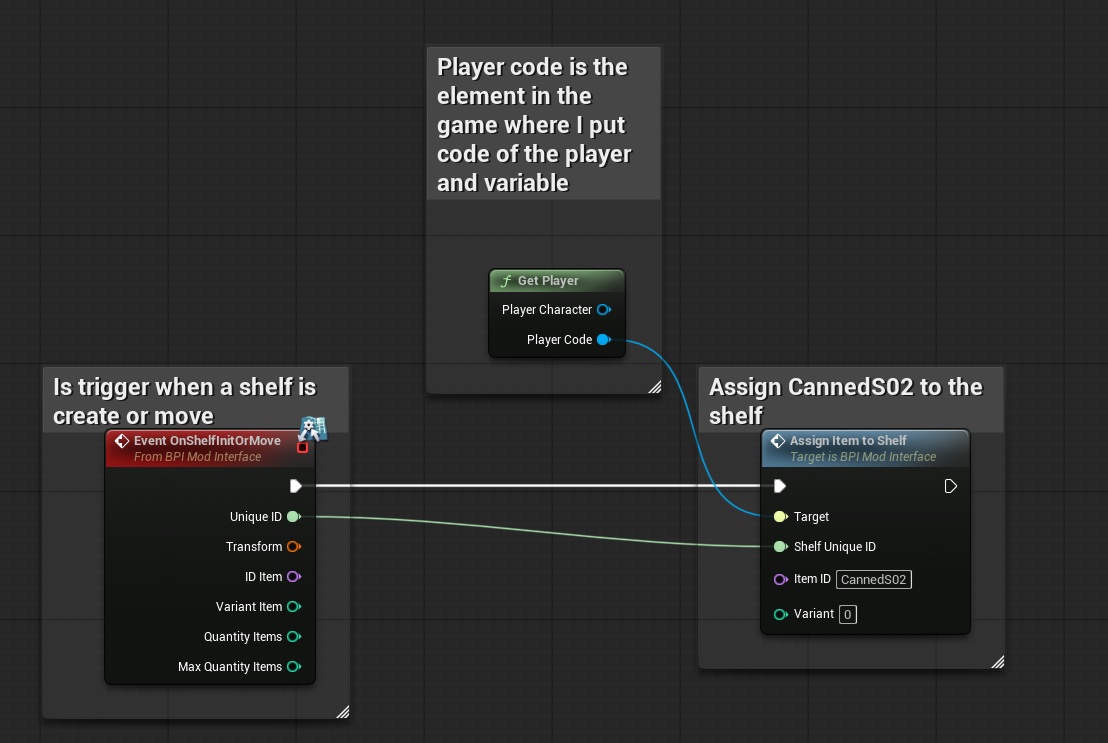
The "AssignItemToShelf" event is used to assign an item to a shelf, usefull for employee go restock the current item, if item are on the shelf, they will be cleared.
To do that, you can use the “AssignItemToShelf” interface with the following inputs:
- ‘Target’ = The “PlayerCode” reference from the “Get player” function
- ‘ShelfUniqueID’ = Here you can enter the unique number that identifies the shelf; this identifier is given by the function "OnShelfInitOrMove"
- ‘ItemID’ = Here you can enter the unique id of item you want to assign to the shelf, this identifier is given by the function "GetAllItemsDetails"
- ‘Variant’ = Here you can enter the variant of the item you want to assign to the shelf, this identifier is given by the function "GetAllItemsDetails"