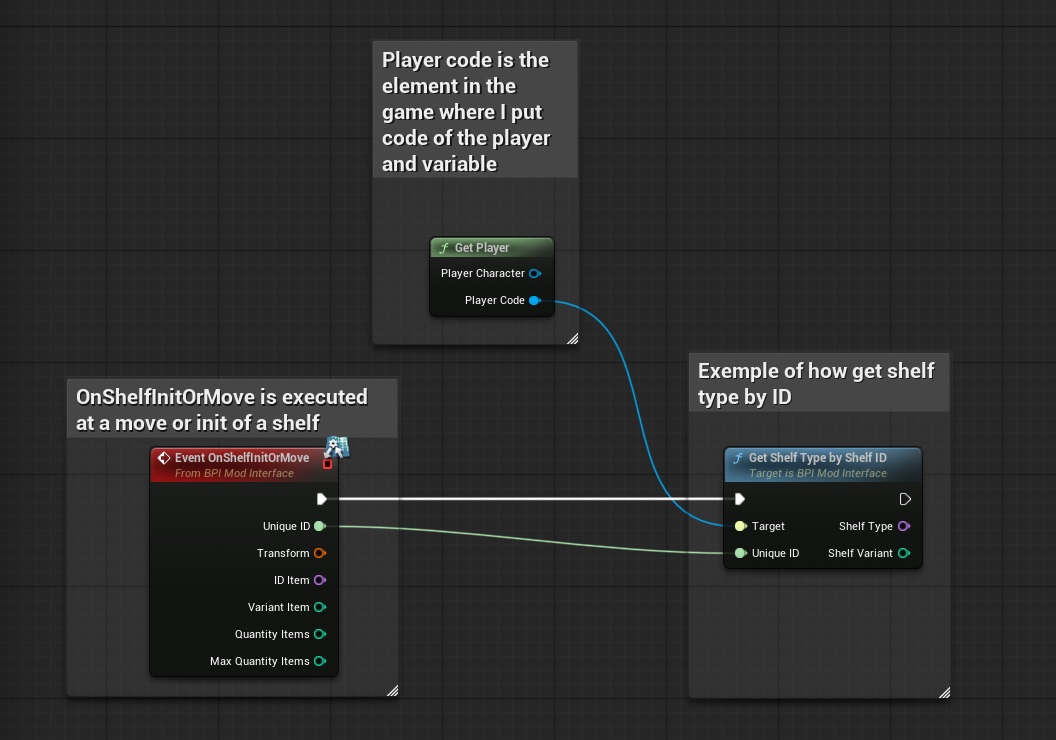
The "GetShelfTypeByShelfID" event is used to provides the identifier that allows you to recognize the type of shelf (example of a shelf type would be a shelf with plates) with a Unique identifier of a shelf
To display in-game notifications, you can use the “DisplayNotification” interface with the following inputs:
- ‘Target’ = The “PlayerCode” reference from the “Get player” function
- ‘UniqueID’ = Here you can enter the unique number that identifies the shelf; this identifier is given by the function "OnShelfInitOrMove"
and the function returns the following parameters:
- ‘ShelfID’ = provides the identifier that allows you to recognize the type of shelf (example of a shelf type would be a shelf with plates)
- ‘VariantShelf’ = gives the number of the variant that is the shelf