If you create and spawn a 3D object (blueprint) in the game, such as a button, that needs to be interactive by the player, here's how to detect player interaction:
- First, open the blueprint that you want the player to be able to interact with.
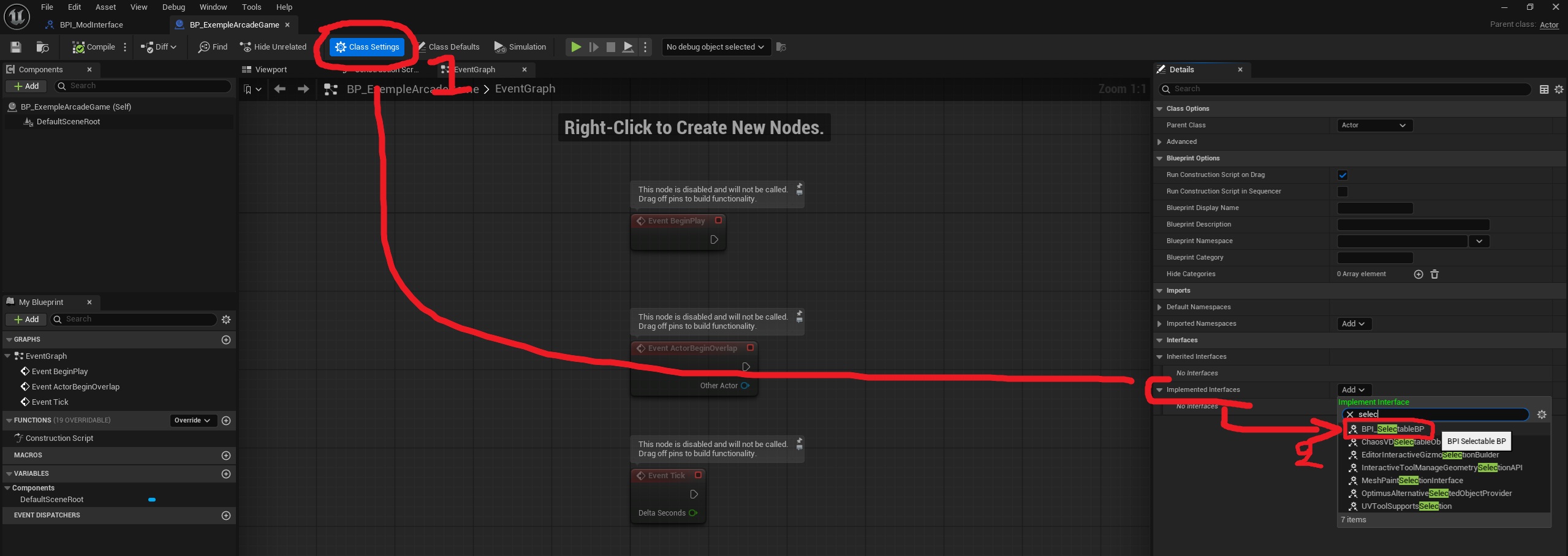
- Click on class settings in the top left corner
- then add the "BPI_selectableBP" interface in the "Implemented Interfaces" parameter under "Details".
- On the left side of the interfaces, you should see the "Interfaces" category. These are events that will execute as soon as the player interacts with them. Here is the list of events:
- On Select BP: Here, the event is executed every time the player clicks on the object (verify that the object has a collision detection for this to work).
- On Select BP SERVER: Here, the event is executed every time the player clicks on the object (verify that the object has a collision detection for this to work). Note that this event does not execute on the player who clicked on it, but only for the host of the game.
- On Right Click BP: Here, the event is executed every time the player right-clicks (or press B on controller) on the object (verify that the object has a collision detection for this to work).
- On Right Click SERVER: Here, the event is executed every time the player right-clicks (or press B on controller) on the object (verify that the object has a collision detection for this to work). Note that this event does not execute on the player who clicked on it, but only for the host of the game.
- On Hover BP: Here, the event is executed every time the player hover the object (when the player put the cursor on the object) (verify that the object has a collision detection for this to work).
- On Unhover BP: Here, the event is executed every time the player stop hovering the object (when the player stop put the cursor on the object) (verify that the object has a collision detection for this to work).
You can create an event with an interface by double-clicking on it in the list on the left.