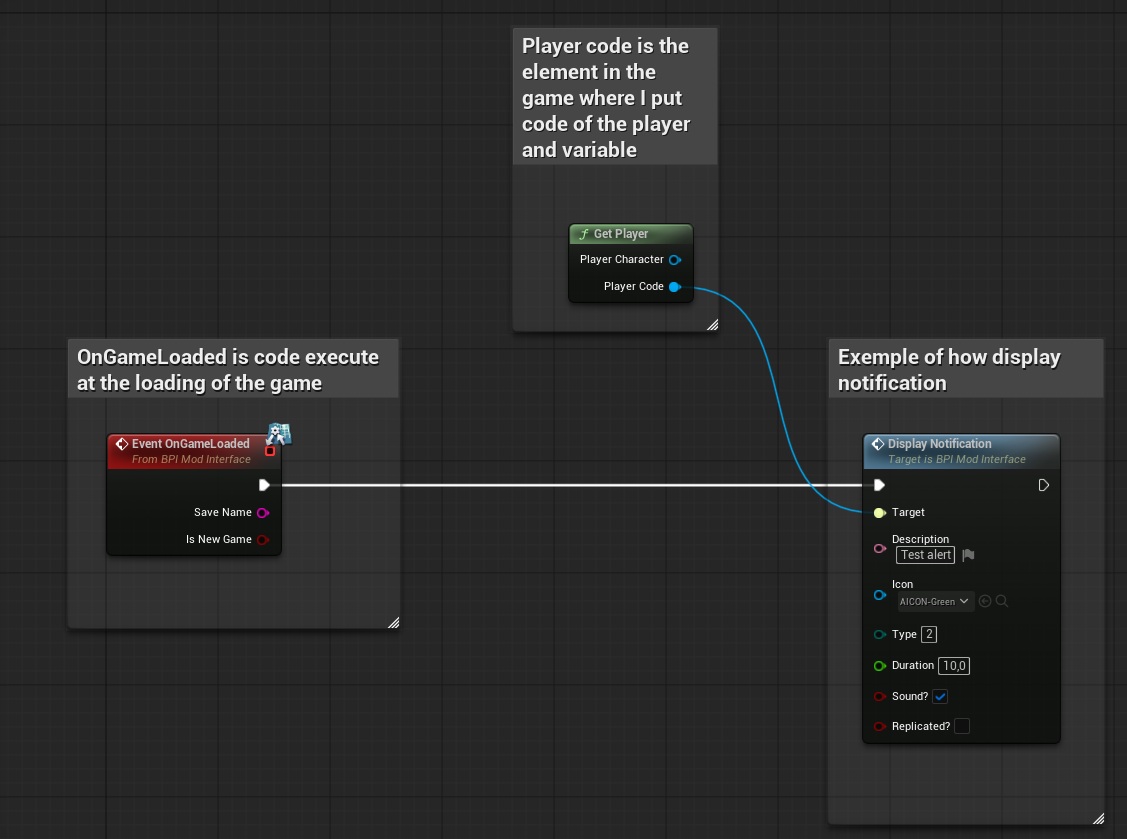
The "DisplayNotification" event is used to display in-game notifications to inform the player with a message.
To display in-game notifications, you can use the “DisplayNotification” interface with the following inputs:
- ‘Target’ = The “PlayerCode” reference from the “Get player” function
- ‘Description’ = Here you can enter the description and therefore the message that the player will be able to read.
- ‘Icon’ = Here you can enter the icon that the player will see with their message.
- ‘Type’ = Here you can enter a number that will change the notification sound and color. Here are the 4 types:
- 0= Red, for error only
- 1= Orange, for warn only
- 2= Green, for success only
- 3= Blue, for information only
- ‘Duration’ = The duration before the notification disappears
- ‘Sound?’ = If checked, then a sound will be played when the notification is displayed; otherwise it will be silence
- ‘Replicated’ = If checked, then all the player will received the notification; otherwise only the local player will received the notification.