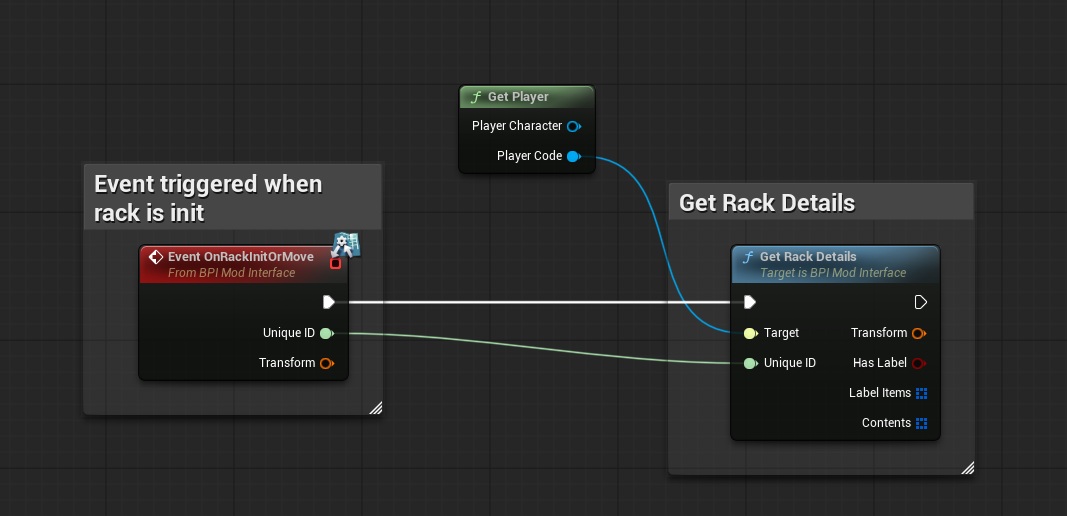
The "GetRackDetails" event is used to provides the identifier that allows you to recognize the detail of the rack with a Unique identifier of a shelf
To display in-game notifications, you can use the “DisplayNotification” interface with the following inputs:
- ‘Target’ = The “PlayerCode” reference from the “Get player” function
- ‘UniqueID’ = Here you can enter the unique number that identifies the rack; this identifier is given by the function "OnRackInitOrMove"
and the function returns the following parameters:
- ‘Transform’ = It gives the position and rotation of the rack (the size too, but it always remains at 1)
- ‘HasLabel’ = indicates whether the player has enabled or disabled the tags on this rack.
- ‘LabelItems’ = gives, in the order of the locations (the locations go from 0 to 11, and are from left to right then from bottom to top of the rack), the item assigned to the label of that location.
- ‘Contents’ = This gives, in the order of the slots (slots go from 0 to 11, and are from left to right then from bottom to top of the rack), the content of the slot (readable by a "break" function on the variable). Here are the different values that this variable contains:
- ‘ContainAPallet’ = indicates whether this location has a pallet or not.
- ‘PalletNbBox’ = gives the number of boxes contained in the pallet
- ‘PalletNbItem’ = gives the number of items contained in the pallet
- ‘PalletItemID’ = gives the Item ID of items contained in the pallet