The "OnCustomerInit" event is executed as soon a customer is spawned;
This also provides the following information:
Input:
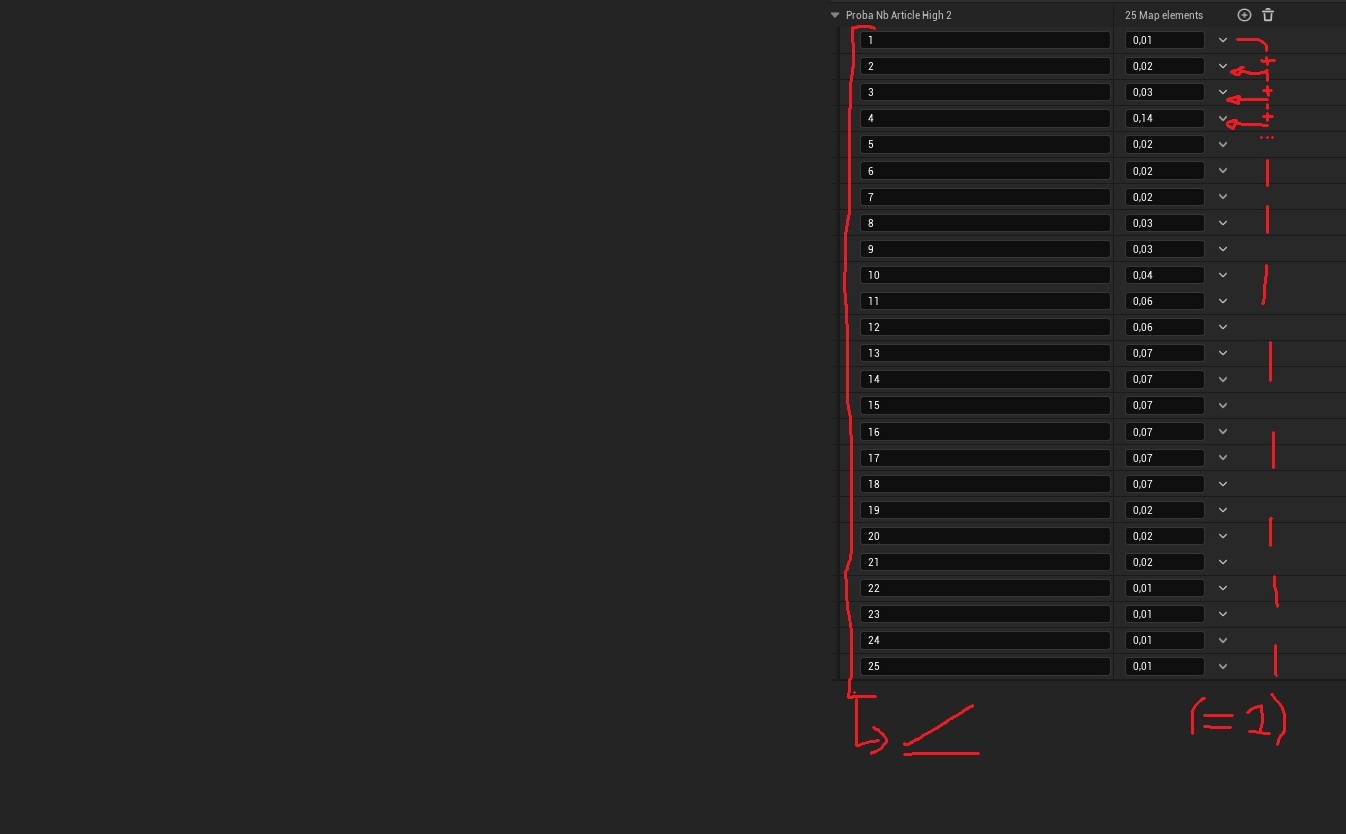
- BASEProbaNbItemsTaken(0-1) - MAP with INTEGER in key and FLOAT value - gives the probability that the customer will buy X items in quantity. The variable consists of a key indicating the number of items, linked to a value indicating the probability (between 0 and 1) of buying the number of items that the key represents. (the sum of the probabilities in the values must be = a 1) (IMPORTANT: Please place each key in ascending order of item purchase.) Here is an example
- BASEProbaNbSameItemsTaken(0-1) - MAP with INTEGER in key and FLOAT value - works the same as the variable above, but indicates the probability of buying the same item, that is to say if the customer buys shampoo, there is X chance that he will buy X shampoo and not just 1.
- BASEProbaThrowTrash(0-1) - FLOAT - gives the probability that the customer will throw away some waste once they enter the store.
- (default 0.1) (a value of 1 indicates a 100% chance, while a value of 0.25 indicates a 25% chance)
- BASESpeed(cm/s) - FLOAT - gives the client's base speed (it is slightly random)
- BASEProbaGoToDistri(0-1) - FLOAT - This gives the probability that the customer will go to an vending machine, if one is available, after having gone to the checkout. (default 0.25) (a value of 1 indicates a 100% chance, while a value of 0.25 indicates a 25% chance)
- BASEProbaTakeNoItemAfterGoingToAShelf(0-1) - FLOAT - gives the probability that a customer goes to a shelf and ultimately takes no items (default 0.3) (a value of 1 indicates a 100% chance, while a value of 0.25 indicates a 25% chance)
And here is the information that is returned to modify the game's logic:
Output:
- ChangeValueCustomer - BOLEAN- Here you must check the variable if you want to change customer information (for the output to take effect).
- BASEProbaNbItemsTaken(0-1) - MAP with INTEGER in key and FLOAT value - Here you must gives the probability that the customer will buy X items in quantity. The variable consists of a key indicating the number of items, linked to a value indicating the probability (between 0 and 1) of buying the number of items that the key represents. (the sum of the probabilities in the values must be = a 1) (IMPORTANT: Please place each key in ascending order of item purchase.) If you do not want to change this value only, then please link the corresponding input (with "BASE" followed by the same name as this output). Here is an example:
- BASEProbaNbSameItemsTaken(0-1) - MAP with INTEGER in key and FLOAT value - works the same as the variable above, but you must gives the probability of buying the same item, that is to say if the customer buys shampoo, there is X chance that he will buy X shampoo and not just 1. If you do not want to change this value only, then please link the corresponding input (with "BASE" followed by the same name as this output).
- BASEProbaThrowTrash(0-1) - FLOAT - Here you must gives the probability that the customer will throw away some waste once they enter the store.
- (default 0.1) (a value of 1 indicates a 100% chance, while a value of 0.25 indicates a 25% chance) If you do not want to change this value only, then please link the corresponding input (with "BASE" followed by the same name as this output)
- BASESpeed(cm/s) - FLOAT - Here you must gives the client's speed If you do not want to change this value only, then please link the corresponding input (with "BASE" followed by the same name as this output)
- BASEProbaGoToDistri(0-1) - FLOAT - Here you must gives the probability that the customer will go to an vending machine, if one is available, after having gone to the checkout. (default 0.25) (a value of 1 indicates a 100% chance, while a value of 0.25 indicates a 25% chance) If you do not want to change this value only, then please link the corresponding input (with "BASE" followed by the same name as this output)
- BASEProbaTakeNoItemAfterGoingToAShelf(0-1) - FLOAT - gives the probability that a customer goes to a shelf and ultimately takes no items (default 0.3) (a value of 1 indicates a 100% chance, while a value of 0.25 indicates a 25% chance) If you do not want to change this value only, then please link the corresponding input (with "BASE" followed by the same name as this output)
-