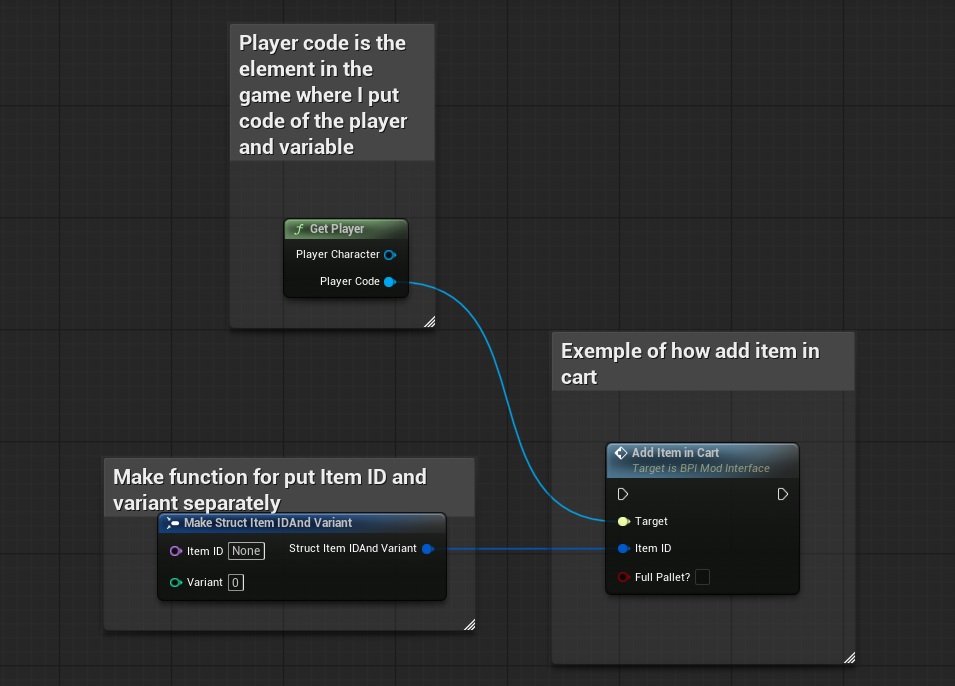
The "AddItemInCart" event is used to add item or pallet of items in the cart of the player (like the scanner).
To add item or pallet of items in the cart of the player, you can use the “AddItemInCart” interface with the following inputs:
- ‘Target’ = The “PlayerCode” reference from the “Get player” function
- ‘Item ID’ = The item ID and the variant you want to add to the cart (can be put separately using the "make" function)
- ‘Full Pallet?’ = Here you register if you want to add only one carton of items (=false) to the basket or as many cartons of items as an entire pallet can accept (=true)